Disclaimer: This article was written as a YouTube Video script, and hence may make reference to audio of visual elements not available on this page.
In this video I am gonna be showing you how to inject 360 degree metadata using Google's spatial media metadata injection tool into an equirectangular video like this to make a video like this. You may want to do this so you can have videos so that your video players automatically play in 360 view mode or if you want to upload to YouTube with 360 video you need to do this as the tool in YouTube video manager said the video is 360 degrees has been deprecated and it now relies completely on the video metadata itself so let's jump straight into the video.
Okay, so to get the program you need to go to GitHub, and look up spatial media metadata injector that is what it's called and it should just bring up this hub page. If it doesn't scroll down within the first couple links you should have a GitHub link which is here it should look straight to the releases but if it doesn't and takes you to here you have to click on the right hand side and click on releases, and it takes you to here and you just need to download either the windows version or mac version depending on what operating system you're on.
So inject the metadata, you just need to to double click on the program, and click 'Open' to select the video that you want to inject the metadata into. The just simply click 'Inject Metadata', and choose where you want to save the file to. After a few seconds, a file should appear wherever you decided to save the file to, and this file now has spatial media. If you open this file in a program that supports 360 degree metadata, or upload it to YouTube it should now play in 360 degree or VR mode. If you are uploading you YouTube, it may take a few minutes to process before the video can be played back in 360 mode.
Sometimes you need to trim a long video clip to get a much smaller section, whether you recorded a much longer video and only need a shorter segment, or need a short clip from an already existing video. The problem with trimming videos using traditional video editors is that they require you to re-encode your video, meaning that it takes a long time, especially on low-end computers, and results in a lowering of video quality. Due to these reasons, it can be useful to know how to trim videos without re-encoding, which essentially just takes the data for he frames you want along with its corresponding audio and copies it into a valid video file. Doing this means that it is super quick, only taking as long as it does to read the file from disk and write your new version.
In order to trim videos in Avidemux, first you need to open the video in Avidemux. This can be done either with using the 'File' menu, or by dragging and dropping the video file onto Avidemux. Then you need to select which part of the video you want. This can be achieved by dragging the selector to the part of the video you want to have as the start of your trimmed video. The use the red-coloured button with an 'A' on it. Then, drag the slider to what you want as the end of your video, and click on the button to the right of that 'A' button, which is labelled 'B'. At this point you have selected the part of your original video to use as your trimmed clip.
To export your clip, simply go 'File' then 'Save As'. This will export your video as an .mkv file, but if you want to change the export format, you can use the drop box directly under 'Output Format' on the left-hand side to change this.
Disclaimer: This article was written as a YouTube Video script, and hence may make reference to audio of visual elements not available on this page. The original article written about this topic, as well as references can be found HERE.
2003. Back when Amazon was little more than a glorified bookstore, and when Netflix and Chill meant to order a DVD on Netflix and wait for it to arrive in the post. 2003 was a year before prevalent online video streaming, and although there were sites and programs like Napster and LimeWire which allowed you to download music and videos, they weren't exactly legal. The only real way to easily access films and TV at the time was to go to a video rental store and rent a VHS Tape or DVD, that or just buy the video outright. Apart from the lack of streaming, not everyone had a phone that they could use a a portable media player to watch videos.
Before we begin, if you enjoy this video, don't forget to subscribe and hit that bell button. YouTube says that most people who watch my videos aren't subscribed. If you think you are subscribed, don't forget to check. YouTube has this bug that unsubscribes people from channels they are subscribed to.
So, let's get back to the video...
Video game consoles have had a lot of accessories throughout the years. So what about for watching videos on a portable console such as the Gameboy Advance? You are probably aware that in the West, the Nintendo GBA had special cartridges released in 2004 that featured low resolution TV show episodes.
In Japan however, Gameboy Advance Video did not exist. Instead they had their own system of playing videos on the Gameboy Advance. This technology is apparently so unheard of in the west that unlike for the Western Gameboy Advance cartridges, Wikipedia doesn't even have an article for their Japanese counterpart.
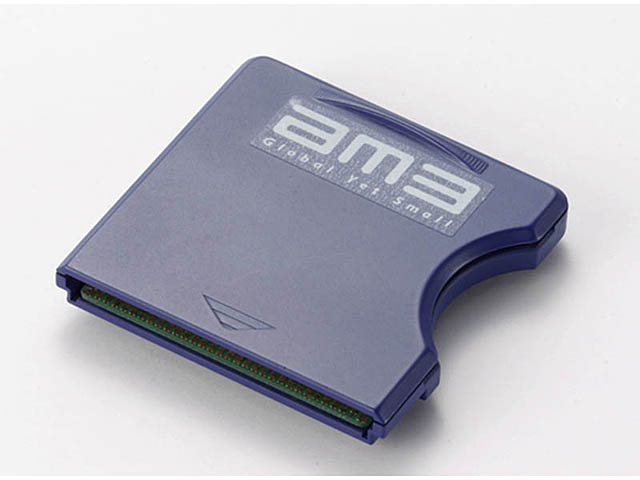
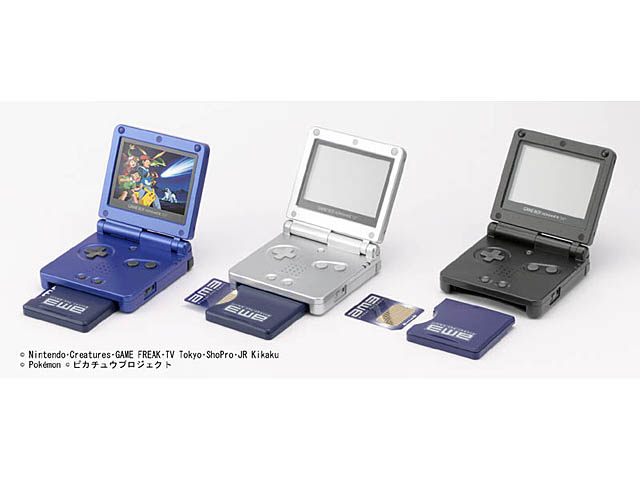
In Japan in 2003, AM3 created their own system for playing videos on the Gameboy Advance, a whole year before the Gameboy Advance cartridges were released. This system was called 'Advance Video', which admittedly has a name very similar to 'Gameboy Advance Video'. AM3's system used a specially designed cartridge that could play videos off of a standard Smart Media card inserted into a slot on the side.
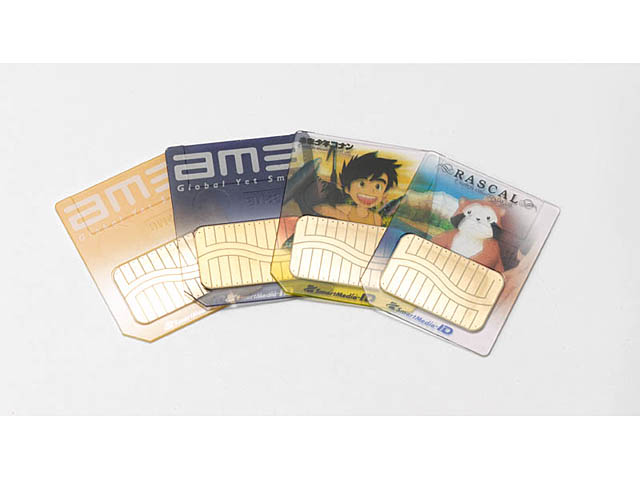
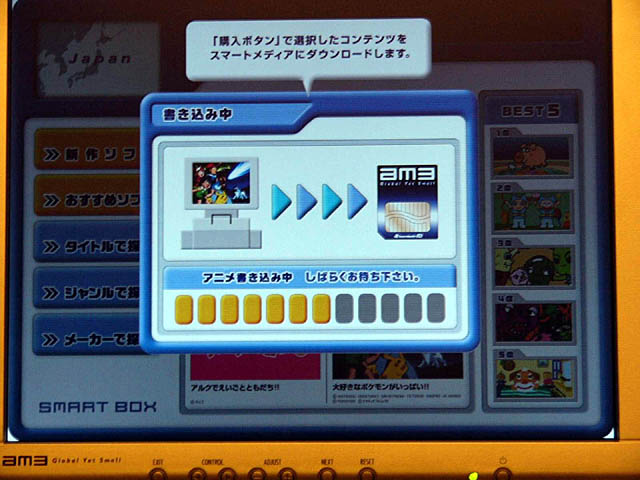
These cards could be purchased either with content already on them, or as blank cards which could be taken to a kiosk to have an episode written on them. There were also packages that included both the adapter as well as a card, or you could buy your cards and adapter separately. After you watched a video, you could keep the card to rewatch the video later, or you could use a kiosk to rewrite the card with a new video. Something interesting to note about these cards, is that they are partially transparent.
These cards can hold up to 24 minutes of animated content on a standard 32 megabyte card, or 192 minutes on a 256 megabyte card. The videos are compressed using a proprietary video compression technology developed in conjunction by Act Image of France, as well as IMAGICA Corporation, which is also known for HDCAM compression.
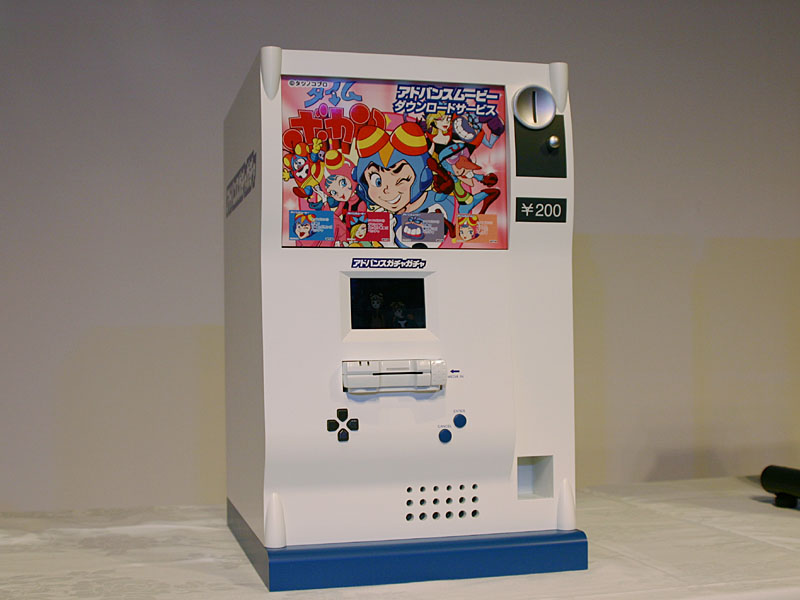
4 titles were available for the launch in May 2003, and the adapter was available for 3200 yen. To use the kiosks to rewrite cards, it would cost you between 100 yen and 500 yen, depending on what exactly you wanted to write on the card. To purchase a new blank card, it would cost you around 1800 yen. These kiosks were called 'Advance Gacha', and were designed to be able to be set up in convenience stores and toy shops. This system was similar to the kiosks set up to allow people in Japan to write Famicom Disk System games onto disks. AM3 planned to set up over 10,000 of these smart media copying machines in Japan by the summer of 2005. These systems were distributed in conjunction with Happinet Co.
A large number of anime titles were made available. The original series announced to be distributed were 'Detective Conan' and 'Time Bokan'. These were all available on prewritten cards, with the first episode of 'Detective Conan', 'The Roller Coaster Murder' being available in a bundle with the adapter, for only 600 yen more than the cost of the adapter itself. That's a pretty good deal if you ask me, considering to just get a blank card will set you back 1800 yen.
With the initial release, you are also paying for the novelty of portable videos. Hasbro's VideoNow also launched in 2003. Although the VideoNow discs were available at a lower price-point, there are several disadvantages. The original VideoNow only worked in black and white, whereas the Advance Video supported colour. The VideoNow player could only be used to watch videos and had no support to play any games. The VideoNow had a much smaller screen, and did not support any kind of rewriteable format.
According to the website for lik-sang, a former importer of Japanese products, content for AM3's Advance Video was planned to be released in stores on CDs, which could then be later transferred to cards. It isn't known whether any CDs with content were ever made or released. This idea is however contradicted by an article by ASCII corp., which claims that the content would utilise DRM that tied data to hardware in order to prevent unauthorised copying. This DRM would make it very hard to write content onto the Smart Media cards yourself. The system adopted a special ROM-specific ID system recorded for each file, so even if it was copied onto a commercially available Smart Media card or even another card with a different video on it, it could not be played. This would be encrypted with DES encryption and use a 128-bit encryption key which would be recorded in the media ROM, and would need to be verified before a video could be played back. Despite this, data from computers and cameras could still be recorded to the memory cards, although this likely could not be accessed with the Advance Video adapter.
When the Western Gameboy Advance Video cartridges were released, they used DRM to stop them from being played on the Gamecube Gameboy adapter, as the owners of the rights to the television series were worried that users would watch their shows on a bigger screen, or even try to record their episodes. AM3's Advance Video adapters however work fine in the Gamecube Gameboy adapter. While we are comparing differences between the two systems, while the western Advance Video cartridges sat flush with the GBA as they were standard sized cartridges, in order to make room for the Smart Media card slots, the Japanese system required a larger cartridge. The adapter is 55 mm long, which is about 1 cm less than an original Gameboy cartridge, meaning it stuck out of a GBA by 2 cm. Interestingly, as the width of a Gameboy cartridge is also about 55 mm, this means that the AM3's Advance Video cartridge is a perfect square.
The player has several functions that can be used whilst playing back video. The system can play and pause using the 'A' button. It can also fast forwards and backwards, using the right and left buttons on the d-pad respectively and by pressing and holding forwards and backwards, you can change between 1x speed, 2x speed, 3x speed, and 4x speed. Some material would also support chapter menus, although earlier content such as the Detective Conan Roller Coaster Murder Case did not. Titles such as the Pokemon titles would support basic interactive menus which allowed the selection of either the main movie, or short commercials for other Pokemon movies.
The player contains no decoding chip, but instead uses the ARM7 CPU of the GBA in conjunction with the specially developed FastVideo codec to allow for video playback. This allowed the player to be built at a low price-point as it did not have to contain any custom chips. Video can be played back at 30 fps and at a resolution of 240 x 160 pixels, the full resolution of the GBA screen.
Lik-sang, also expected a wide range of content to be released for the system including animated content, aka. the anime shows, game and movie trailers, similar to what is available on the Pokemon cards, pictures, music, educational software titles, ebooks, as well as karaoke.
This is also backed up by a 2004 GameSpot article which claims that AM3 was also planning to release other peripherals that would work with different types of media. These included: Advance Picture for still images, Advance Music for music, Advance Comic for manga, and Advance Navi for maps.
According to ASCII, AM3 would release animated content at first, but planned to also release other content such as eBooks, so that the GBA and GBA SP could be used for educational materials. Nintendo however prohibited the company from using the technology to distribute any games or adult materials.
Looking at listings for the Smart Media Player on Amazon.co.jp (which can be found by searching for 'AM3' under the category 'TV games'), it can be seen that cards were released for many anime series including, but not limited to: Meitantei Conan/Detective Conan also known as Case Closed, Pokemon, Lelere's Genius Bakabon, Crayon Shin-chan, and Time Bokan.
These releases could have either television series episodes or movies on them. During the time of the Nintendo DS, smart media cards continued to be released with Nintendo DS branding on the packaging, although they were still the same GBA cartridge design. AM3 would go on to release DSVision, which was a similar concept to the Smart Media Player except it took Micro SD/TF cards and was housed in a special DS cartridge that looked similar to a DS flash cart.
The ActImage codec was announced by Shinji Hashimoto, the executive officer of Square Enix to also be planned for use in the GBA game 'Kingdom Hearts Chain of Memories', which did feature rendered cut-scenes. Although from research I cannot find whether it was in fact this codec used to compress the video used in cut-scenes, it likely was due to this announcement.
In 2005, am3 would also provide 'Poke Park Advanced Navi' at PokePark, the world's first Pokemon theme park, which was a video utilising the Advance Video technology and could be written free of charge onto a card using an 'Advance Gachapon' system. They also operated a lending system there, where a guest could pay 2100 yen to rent a system with the card and movie, 2000 yen being given back to the guest on the system's return.
Currently, there does not appear to be much information on the internet about the AM3 Smart Media Player, or at least it is not easily accessible. Many sites that contain information about the product such as 'lik-sang.com' are no longer available, and many western sites did not cover this product as it did not have an international release, unlike Gameboy Advance Video. It is likely that the Smart Media Player was not released internationally, due to the success of Gameboy Advance Video, and it's much simpler nature only requiring a cartridge for each video, instead of a bulky adapter with fancy media cards. Some information can be found through listings on sites such as Amazon.co.jp, which is not normally used by people outside of Japan, which makes it hard for people to discover AM3's Advance Video smart media player.
If you enjoyed this video don't forget to like and subscribe, and hit that bell icon so you get notified when new videos release.
The video title "Ukrainian military band - A Cruel Angel Thesis" claims that this video shows a Ukrainian military band playing the song 'A Cruel Angel's Thesis', which is the opening to the 90s anime Neon Genesis Evangelion, and which has resurfaced in more recent years as a meme. So this video was posted on YouTube on the 18th of August 2015 by the YouTuber Sergey Gorin and has since gained its meme status. So the questions are, what legacy did this video create, and is it real? Could it at all be staged or in some way edited?
Here is what seems like a direct sequel to the original. This one oddly seems to be the exact same length (38 seconds) as the original, and just listening to them side by side, the audio tracks of both appear to be identical, so on a first glance it seems to just be another
This video was copied and parodied many times. Below is an example that dubs audio over another video. It is the edit, the original video and then the audio source. The edited video credits the original sources in its description.
Remember when I said that the video was released in August of 2015, here is the original published on the 27th of June 2015, 2 whole months earlier for you to enjoy. So yes, it is fake, just a different audio track laid over an already great clip. If you are at all wondering how I found this video, I searched "funny dancing ukrainian man" on Google and the video was the first result.
Information sourced from Wikipedia: [x]
In Japan in 2003, the AM3 Smart Media Player was released which allowed users to watch anime from special Smart Media Cards. This would never become popular internationally due to the release of Gameboy Advance Video.
A YouTube Video About GBA Video
GBA Video consisted of a series of standard sized GBA carts each with a compressed video on them. The cartridges were developed by 4Kids Technology [1]. The cartridges had a uniquely coloured light-grey/white shell in contrast to the dark grey shell of regular GBA carts. Videos on the carts were in 240x160 resolution, the regular resolution of GBA games, except for the Shrek and Shark Tales pack which was at 112p [2].
GBA Video was released in North America in May 2004 [x]. In November 2005, Majesco started to sell full-length animated films [x]. Due to license agreements with the owners of the television series, GBA Video Paks will not work on the GameCube Gameboy Player, using a the same logo authentication check used by games that support controller rumble, and will instead freeze on a screen "Not compatible with Game Boy Player" [x].
"Brobot"
"The Big Pinch"
"Granny Baby"
"Time is Money"
All Grown Up! vol. 1
"Susie Sings the Blues"
"Coup de Ville"
Cartoon Network Collection vol. 1
Ed, Edd 'n Eddy: "Stop, Look and Ed"
Courage the Cowardly Dog: "Magic Tree of Nowhere"
Johnny Bravo: "The Perfect Gift"
The Grim Adventures of Billy & Mandy: "Crawling Niceness"
Cartoon Network Collection vol. 2
Codename: Kids Next Door: "Operation T.U.R.N.I.P."
Courage the Cowardly Dog: "Courage the Fly"
Johnny Bravo: "Balloon Platoon"
The Grim Adventures of Billy & Mandy: "Mandy the Merciless"
Cartoon Network Collection Limited Edition
Ed, Edd 'n Eddy: "Key to My Ed"
Courage the Cowardly Dog: "The Queen of the Black Puddle"
Codename: Kids Next Door: "Operation M.I.N.I.G.O.L.F."
Dexter's Laboratory: "Big Sister"
Cartoon Network Collection Platinum Edition
Codename: Kids Next Door: "Operation T.O.M.M.Y."
The Grim Adventures of Billy & Mandy: "A Grim Surprise"
Courage the Cowardly Dog: "Cowboy Courage"
Ed, Edd 'n Eddy: "The Luck of the Ed"
Cartoon Network Collection Premium Edition
Dexter's Laboratory: "Double Trouble"
Courage the Cowardly Dog: "The Shadow of Courage"
Johnny Bravo: "Cookie Crisis"
Ed, Edd 'n Eddy: "A Glass of Warm Ed"
Cartoon Network Collection Special Edition
Ed, Edd 'n Eddy: "Oath to an Ed"
Johnny Bravo: "Beach Blanket Bravo"
The Grim Adventures of Billy & Mandy: "Billy and the Bully"
Dexter's Laboratory: "Dexter's Rival"
Video game consoles have had a lot of accessories throughout the years, all the way from retro consoles like the Atari VCS with its Starpath/Arcadia Supercharger of Coleco Kid Vid Voice Module accessories, to modern consoles such as the Xbox and PlayStation consoles, and this was no different for handheld consoles such as the GBA. Now, users have to anime, TV shows and movies on their consoles, phones and computers, but it was always like this.
Looking at the title, you may be wondering why anyone would want to watch video on the Gameboy Advance, but this is actually a unique way to watch anime on a video game console, when streaming anime online was not as accessible as it is now, and when handheld systems did not have the ability to access the internet. Apparently this topic is so unique, that even Wikipedia does not have an article on this topic. Also coming back and editing this article with further details, the version that was released that was designed to just play the anime cards is officially called 'Advance Video' [7].
In the United States and internationally, Game Boy Advance Video cartridges were made available which on standard Gameboy Advance cartridges contained a heavily compressed copy of one of many series or movies. A large list of animated television episodes and movies were released. In Japan however, AM3's own system existed which allowed users to view videos on their Gameboy Advance systems from smart media cards.
Gameboy Advance Video Advertisement (source: YouTube)
AM3 created a system in 2003 [1] with an adapter that allowed users to insert special Smart Media Cards which contained videos, and that could play these videos. The cartridge contains special software and has a slot on the side allowing the user to insert a standard sized Smart Media card. A wide range of anime titles would be made available for purchase on prerecorded Smart Media cards, or blank anime-themed cards could be purchased.
Individually packaged cards could be purchased with videos on them, or bundled with the card reader adapter. The adapter could also be purchased separately, and with blank Smart Media Cards. Sets of Smart Media Player adapters with blank branded cards could be purchased themed around some series.
The cards can hold up to 24 minutes of animated content on a standard 32 Megabyte card, or 192 minutes on a 256 Megabyte Smart Media Card [6]. The videos uses a proprietary video compression technology by both Act Image of France as well as IMAGICA Corporation, which is also known for HDCAM video compression [2][2(archived)]. These cards were partially transparent [6]. 4 titles were available at launch in May 2003 and the adapter was available for 3200 yen [7]. Additional titles could be written to blank cards for a price of between 100 yen and 500 yen, and blank cards were available for purchase at a price of 1800 yen. Kiosks were also set up that allowed customers to purchase videos and have them copied onto blank Smart Media cards or write over cards that already have videos on them. There were also dedicated kiosks for one particular program known as 'Advance Gacha' and were planned to be placed in convenience stores and toy stores [7]. This is similar to the way that the Family Computer Disk System in Japan had kiosks set up that allowed users to purchase Famicom Disk System games and have them written onto disks. AM3 planned to have over 10,000 of these machines to copy onto blank cards by the summer of 2005 [4]. The cards were distributed in conjunction with Happinet Co [6].
A mock of an 'Advance Gacha' system
Image from: link
A pricing table has been added below:
Release date
Content
Price
Adapter
November 20
Advanced Movie Adapter
3,200 yen
Adapter + Movie Card Set
November 20
Advanced Movie Adapter Detective Conan 'Roller Coaster Murder'
You might think that the prices listed for a single low quality copy of an episode are expensive at about 25 USD per episode given how cheap it is to buy a digital movie or TV series online, but with this technology, you were really paying for the novelty of it, and at this time, there was really no way to watch videos on the go or in a portable manner, except for perhaps Hasbro's VideoNow which offered content at a lower price point, but only in black and white for the original version and which may not have been released in Japan.
Image Used With Permission, Credit: u/karulg on Reddit
According to the website lik-sang, a former importer of Japanese products, content for AM3's smart media player was planned to be released in stores on CDs with content on them, and which could be transferred to cards [2][2(archived)][7]. It is not known whether these CDs were ever released. This is however contradicted by ASCII corp. which claims that the content would utilise DRM that tied data to hardware in order to prevent unauthorised copying. The system adopted a special ROM-specific ID system recorded for each file, so even if it was copied onto a commercially available Smart Media card, it could not be played. This would be encrypted with DES encryption and use a 128-bit encryption key which would be recorded in the media ROM, and would need to be verified before a video could be played back. Despite this, data from computers and cameras could still be recorded to the memory cards [6].
Unlike Gameboy Advance Video which would not allow users to play the cartridges on the Gamecube Gameboy adapter, the AM3 Smart Media Player could be used on the Gamecube [5]. The adapter is 55 mm long and extends 20 mm out of the GBA [6].
The player has several functions that can be used whilst playing back video. These are play and pause using the 'A' button, fast forwards and backwards, using the right and left buttons on the d-pad respectively, and pressing and holding for forwards and backwards at 1x speed, 2x speed, 3x speed, and 4x speed. Some material would also support chapter menus, although earlier content such as the Detective Conan Roller Coaster Murder Case did not [6]. Titles such as the Pokemon titles would support basic interactive menus which allowed the selection of either the main movie, or short commercials for other Pokemon movies to watch [u/karulg on Reddit].
The player contains no decoding chip, but instead uses the ARM7 CPU of the GBA in conjunction with the specially developed FastVideo codec to allow video playback. This allowed the player to be built at a low price-point as it did not have to contain any custom chips. Video can be played back at 30 fps and at a resolution of 240 x 160 pixels, the full resolution of the GBA screen [6].
Lik-sang, a international distributor expected a wide range of content to be released for the system including [2][2(archived)]:
Animated content
Game and movie previews and trailers
Pictures
Music
Educational software titles
E-books
Karaoke
This is also backed up by a 2004 GameSpot article which claims that AM3 was also planning to release other peripherals that would works with different types of media. These included [4]:
Advance Picture for still images
Advance Music for music
Advance Comic for manga
Advance Navi for maps
According to ASCII, the company was releasing animated content at first, but planned to also release other content such as eBooks, so that the GBA and GBA SP could be used for educational materials. Nintendo however prohibited the company from using the technology to distribute any games or adult materials [6].
Looking at listings for the Smart Media Player on Amazon.co.jp (which can be found by searching for 'AM3' under the category 'TV games'), it can be seen that cards were released for many anime series including, but not limited to:
These releases could have either television series episodes or movies on them. During the time of the Nintendo DS, smart media cards continued to be released with Nintendo DS branding on the packaging, although they were still the same GBA cartridge design. AM3 would go on to release DSVision, which was a similar concept to the Smart Media Player except it took Micro SD/TF cards and was housed in a special DS cartridge that looked similar to a DS flash cart.
The ActImage codec was announced by Shinji Hashimoto, the executive officer of Square Enix to also be planned for use in the GBA game 'Kingdom Hearts Chain of Memories', which did feature rendered cut-scenes. Although from research I cannot find whether it was in fact this codec used to compress the video used in cut-scenes, it likely was due to this announcement [7].
In 2005, am3 would also provide 'Poke Park Advanced Navi' at PokePark, the world's first Pokemon theme park, which was a video utilising the Advance Video technology and could be written free of charge onto a card using an 'Advance Gachapon' system. They also operated a lending system there, where a guest could pay 2100 yen to rent a system with the card and movie, 2000 yen being given back to the guest on the system's return [8].
Currently, there does not appear to be much information on the internet about the AM3 Smart Media Player, or at least it is not easily accessible. Many sites that contain information about the product such as 'lik-sang.com' are no longer available, and many western sites did not cover this product as it did not have an international release, unlike Gameboy Advance Video. It is likely that the Smart Media Player was not released internationally, due to the success of Gameboy Advance Video, and it's much simpler nature only requiring a cartridge for each video, and not a bulky adapter with fancy media cards. Some information can be found through listings on sites such as Amazon.co.jp, which is not normally used by people outside of Japan, which makes it hard for people to discover the AM3 Smart Media Player.