Showing posts with label nintendo. Show all posts

2021-04-16

How Super Mario Bros. Does Scrolling

Disclaimer: This article was written as a YouTube Video script, and hence may make reference to audio of visual elements not available on this page.

Super Mario Brothers, released in 1985 is probably one of the most famous video games of all time, spawning countless incarnations and spin offs. Super Mario bros helped to define the modern side scroller and platformer genres. It’s simple mechanic of trying to get from the left off the level to the right by jumping on platforms whilst avoiding obstacles helped to cement it into the hearts of people everywhere. 

Before we get into this video, YouTube says that only a few percent of you guys watching are subscribed. So if you enjoy this video, don’t forget to subscribe. YouTube also has this glitch that unsubscribes people from channels that they are subscribed to, if you think you’re already subscribed, don’t forget to check.

So, let’s get back to the video…

So how does scrolling work in Super Mario Bros? One thing to keep in mind that compared to many modern computers, the 8-bit NES is fairly low powered, utilising a variety of the cheap 6502 processor that was popular at the time. Another thing to keep in mind is how graphics on the NES worked. NES games worked on the basis of a 256x240 screen. Everything that you saw on screen was made up of 8 by 8 tiles in the background, which combined into 16 by 16 groups of pixels called blocks. 8 by 8 or 8 by 16 sprites could be placed on top, which could be placed anywhere, although only 8 of these can be drawn in a given scan line.

Many early games on the NES did not even feature scrolling, instead opting to use static screens for different levels, or games like 'The Legend of Zelda' only scrolling under controlled conditions such as when changing between these static screens.

One thing that you’ll notice playing the original Super Mario Bros is that the screen can only scroll right. As you run to the right, the screen scrolls with you, but if you decide to go back the other way, the screen doesn’t scroll back with you and you hit the side of the screen. If a power up happens to go off the left side of the screen, you’ve lost it.

This mechanic of the screen only scrolling one way is intrinsic in simplifying how scrolling works, in order to allow for Super Mario Bros. to have clean scrolling like it does.

Super Mario Bros levels can be quite long. The NES can not hold an entire level in memory, instead it can only load a much smaller section of the level into memory. It holds the loaded section of the background in what is called a name table. The NES can hold 4 nametables, which consist of one byte for each 8 by 8 tile contained in those nametables, as well as space for storing colour palette information for the background. Each nametable consists of 32 tiles in width, by 30 tiles in height, for a total of 960 tiles. This is 960 bytes in size, and the attribute table, which is what stores the colour palette information, takes this up to a total of 1024 bytes, or 1 kibibyte. A screen displayed by the NES uses one of those name tables, and the tiles from them are displayed in the screen.

Scrolling on the NES basically works by applying an offset to which part of the nametable is being viewed, and as the visible portion moves past the right-most part of the nametable, it loops over back to the start.

Now, the NES could use this for scrolling with one of these nametables, but then this would just be the same screen repeating over and over again, as this is the size of the visible portion of the screen.

Instead, scrolling on the NES typically uses what is referred to as mirroring, more specifically, nametable mirroring. There are a few different types of nametable mirroring, which all join up different nametables and are generally used when doing different types of scrolling. Vertical mirroring joins nametables on a horizontal plane to each other, effectively creating a 64 by 30 sized nametable, twice the width of what is visible on the screen.

This is all well and good, but this only accounts for a level two screens wide, unless you want to have the level repeat again. If you’ve ever played or watched someone play Super Mario Bros., you’re probably very aware that levels can be much wider than two screens. So how does Super Mario Bros. achieve having much wider levels?

This has much to do with the fact that only half of the nametable when using this nametable mirroring method is visible on screen. Because only half of the nametable’s tiles are visible on screen, this leaves the other half to have its tiles freely manipulated without this change being noticeable to the end user. When a row of tiles disappears off of the left-hand side of the screen, it can be updated with the tiles that come after the last tiles on the right hand side of the nametable. This process continues as the screen scrolls further, so that when the visible portion of the screen reaches the right of the nametable and wraps back around to the start of the nametable, the tiles there have been replaced, making it seem as though the level continues past this point. To answer the question why Super Mario Bros. only allows you to scroll one way, well the answer is that it is to simplify the scrolling process, as you only need to keep track of scrolling for one direction to replace tiles, as if you allowed scrolling both ways, you would also need to account for replacing tiles as you scroll left, which makes it a lot more complicated.

Of course there are games on the NES that do allow scrolling both left and right, and games like Super Mario Bros. 3 allow you to scroll in all four directions, but how that is done can be a topic for another day.

If you enjoyed this video and want to see more like it, don’t forget to like the video, subscribe down below and hit that bell icon, so that you get notified whenever a new video is released. If you have any ideas for future videos, feel free to leave them in the comments section down below.


2021-01-02

Japanese Anime For Gameboy Advance (Script Version)

Disclaimer: This article was written as a YouTube Video script, and hence may make reference to audio of visual elements not available on this page. The original article written about this topic, as well as references can be found HERE.

2003. Back when Amazon was little more than a glorified bookstore, and when Netflix and Chill meant to order a DVD on Netflix and wait for it to arrive in the post. 2003 was a year before prevalent online video streaming, and although there were sites and programs like Napster and LimeWire which allowed you to download music and videos, they weren't exactly legal. The only real way to easily access films and TV at the time was to go to a video rental store and rent a VHS Tape or DVD, that or just buy the video outright. Apart from the lack of streaming, not everyone had a phone that they could use a a portable media player to watch videos.

Before we begin, if you enjoy this video, don't forget to subscribe and hit that bell button. YouTube says that most people who watch my videos aren't subscribed. If you think you are subscribed, don't forget to check. YouTube has this bug that unsubscribes people from channels they are subscribed to.

So, let's get back to the video...

Video game consoles have had a lot of accessories throughout the years. So what about for watching videos on a portable console such as the Gameboy Advance? You are probably aware that in the West, the Nintendo GBA had special cartridges released in 2004 that featured low resolution TV show episodes.

In Japan however, Gameboy Advance Video did not exist. Instead they had their own system of playing videos on the Gameboy Advance. This technology is apparently so unheard of in the west that unlike for the Western Gameboy Advance cartridges, Wikipedia doesn't even have an article for their Japanese counterpart.

In Japan in 2003, AM3 created their own system for playing videos on the Gameboy Advance, a whole year before the Gameboy Advance cartridges were released. This system was called 'Advance Video', which admittedly has a name very similar to 'Gameboy Advance Video'. AM3's system used a specially designed cartridge that could play videos off of a standard Smart Media card inserted into a slot on the side.

These cards could be purchased either with content already on them, or as blank cards which could be taken to a kiosk to have an episode written on them. There were also packages that included both the adapter as well as a card, or you could buy your cards and adapter separately. After you watched a video, you could keep the card to rewatch the video later, or you could use a kiosk to rewrite the card with a new video. Something interesting to note about these cards, is that they are partially transparent.

These cards can hold up to 24 minutes of animated content on a standard 32 megabyte card, or 192 minutes on a 256 megabyte card. The videos are compressed using a proprietary video compression technology developed in conjunction by Act Image of France, as well as IMAGICA Corporation, which is also known for HDCAM compression.

4 titles were available for the launch in May 2003, and the adapter was available for 3200 yen. To use the kiosks to rewrite cards, it would cost you between 100 yen and 500 yen, depending on what exactly you wanted to write on the card. To purchase a new blank card, it would cost you around 1800 yen. These kiosks were called 'Advance Gacha', and were designed to be able to be set up in convenience stores and toy shops. This system was similar to the kiosks set up to allow people in Japan to write Famicom Disk System games onto disks. AM3 planned to set up over 10,000 of these smart media copying machines in Japan by the summer of 2005. These systems were distributed in conjunction with Happinet Co.

A large number of anime titles were made available. The original series announced to be distributed were 'Detective Conan' and 'Time Bokan'. These were all available on prewritten cards, with the first episode of 'Detective Conan', 'The Roller Coaster Murder' being available in a bundle with the adapter, for only 600 yen more than the cost of the adapter itself. That's a pretty good deal if you ask me, considering to just get a blank card will set you back 1800 yen.

With the initial release, you are also paying for the novelty of portable videos. Hasbro's VideoNow also launched in 2003. Although the VideoNow discs were available at a lower price-point, there are several disadvantages. The original VideoNow only worked in black and white, whereas the Advance Video supported colour. The VideoNow player could only be used to watch videos and had no support to play any games. The VideoNow had a much smaller screen, and did not support any kind of rewriteable format.

According to the website for lik-sang, a former importer of Japanese products, content for AM3's Advance Video was planned to be released in stores on CDs, which could then be later transferred to cards. It isn't known whether any CDs with content were ever made or released. This idea is however contradicted by an article by ASCII corp., which claims that the content would utilise DRM that tied data to hardware in order to prevent unauthorised copying. This DRM would make it very hard to write content onto the Smart Media cards yourself. The system adopted a special ROM-specific ID system recorded for each file, so even if it was copied onto a commercially available Smart Media card or even another card with a different video on it, it could not be played. This would be encrypted with DES encryption and use a 128-bit encryption key which would be recorded in the media ROM, and would need to be verified before a video could be played back. Despite this, data from computers and cameras could still be recorded to the memory cards, although this likely could not be accessed with the Advance Video adapter.

When the Western Gameboy Advance Video cartridges were released, they used DRM to stop them from being played on the Gamecube Gameboy adapter, as the owners of the rights to the television series were worried that users would watch their shows on a bigger screen, or even try to record their episodes. AM3's Advance Video adapters however work fine in the Gamecube Gameboy adapter. While we are comparing differences between the two systems, while the western Advance Video cartridges sat flush with the GBA as they were standard sized cartridges, in order to make room for the Smart Media card slots, the Japanese system required a larger cartridge. The adapter is 55 mm long, which is about 1 cm less than an original Gameboy cartridge, meaning it stuck out of a GBA by 2 cm. Interestingly, as the width of a Gameboy cartridge is also about 55 mm, this means that the AM3's Advance Video cartridge is a perfect square.

The player has several functions that can be used whilst playing back video. The system can play and pause using the 'A' button. It can also fast forwards and backwards, using the right and left buttons on the d-pad respectively and by pressing and holding forwards and backwards, you can change between 1x speed, 2x speed, 3x speed, and 4x speed. Some material would also support chapter menus, although earlier content such as the Detective Conan Roller Coaster Murder Case did not. Titles such as the Pokemon titles would support basic interactive menus which allowed the selection of either the main movie, or short commercials for other Pokemon movies.

The player contains no decoding chip, but instead uses the ARM7 CPU of the GBA in conjunction with the specially developed FastVideo codec to allow for video playback. This allowed the player to be built at a low price-point as it did not have to contain any custom chips. Video can be played back at 30 fps and at a resolution of 240 x 160 pixels, the full resolution of the GBA screen.

Lik-sang, also expected a wide range of content to be released for the system including animated content, aka. the anime shows, game and movie trailers, similar to what is available on the Pokemon cards, pictures, music, educational software titles, ebooks, as well as karaoke.

This is also backed up by a 2004 GameSpot article which claims that AM3 was also planning to release other peripherals that would work with different types of media. These included: Advance Picture for still images, Advance Music for music, Advance Comic for manga, and Advance Navi for maps.

According to ASCII, AM3 would release animated content at first, but planned to also release other content such as eBooks, so that the GBA and GBA SP could be used for educational materials. Nintendo however prohibited the company from using the technology to distribute any games or adult materials.

Looking at listings for the Smart Media Player on Amazon.co.jp (which can be found by searching for 'AM3' under the category 'TV games'), it can be seen that cards were released for many anime series including, but not limited to: Meitantei Conan/Detective Conan also known as Case Closed, Pokemon, Lelere's Genius Bakabon, Crayon Shin-chan, and Time Bokan.

These releases could have either television series episodes or movies on them. During the time of the Nintendo DS, smart media cards continued to be released with Nintendo DS branding on the packaging, although they were still the same GBA cartridge design. AM3 would go on to release DSVision, which was a similar concept to the Smart Media Player except it took Micro SD/TF cards and was housed in a special DS cartridge that looked similar to a DS flash cart.

The ActImage codec was announced by Shinji Hashimoto, the executive officer of Square Enix to also be planned for use in the GBA game 'Kingdom Hearts Chain of Memories', which did feature rendered cut-scenes. Although from research I cannot find whether it was in fact this codec used to compress the video used in cut-scenes, it likely was due to this announcement.

In 2005, am3 would also provide 'Poke Park Advanced Navi' at PokePark, the world's first Pokemon theme park, which was a video utilising the Advance Video technology and could be written free of charge onto a card using an 'Advance Gachapon' system. They also operated a lending system there, where a guest could pay 2100 yen to rent a system with the card and movie, 2000 yen being given back to the guest on the system's return.

Currently, there does not appear to be much information on the internet about the AM3 Smart Media Player, or at least it is not easily accessible. Many sites that contain information about the product such as 'lik-sang.com' are no longer available, and many western sites did not cover this product as it did not have an international release, unlike Gameboy Advance Video. It is likely that the Smart Media Player was not released internationally, due to the success of Gameboy Advance Video, and it's much simpler nature only requiring a cartridge for each video, instead of a bulky adapter with fancy media cards. Some information can be found through listings on sites such as Amazon.co.jp, which is not normally used by people outside of Japan, which makes it hard for people to discover AM3's Advance Video smart media player.

If you enjoyed this video don't forget to like and subscribe, and hit that bell icon so you get notified when new videos release.

2020-12-29

The Pepsi DS

Disclaimer: This article was written as a YouTube Video script, and hence may make reference to audio of visual elements not available on this page.

It was only a few weeks ago that the McDonalds special edition Nintendo DSi was brought into the mainstream by Nick Robinson's YouTube video. That system was distributed to Japanese McDonalds stores along with one of two special training DS cartridge games, but did you know that this was not the first specially branded DS console made in collaboration with a food company?

This title for first branded DS goes back further than the DSi, further than even the Nintendo DS Lite, all the way back to the classic grey original Nintendo DS. While it may not be the first specially branded DS, the title for the first branded DS by a food company definitely goes to the PEPSI X NINTENDO collaboration Nintendo DS, a blue branded recolouring of the original DS' plastic, with a specially printed logo above the Nintendo badge.

I found out about this special DS whilst looking at different game auctions on Yahoo Auctions Japan. It can be interesting to see what video game things exist in Japan, and this system piqued my interest. So how did this special DS come into existence?

Link to Auction: https://page.auctions.yahoo.co.jp/jp/auction/o448087868

Pepsi has a long history in Japan. The cola drink was launched by the Japan Pepsi Cola Company in 1958. As well as the soft drink Pepsi, other PepsiCo brands have become some of the largest food brands in Japan, with Pepsi being a popular beverage in Japan.

Source for Pepsi History: https://www.pepsico.com/pepsicojapan.html

Pepsi Twist and Diet Pepsi Twist are two low-sugar Pepsi variations, originally released in 2000 in the United States. When saccharin was used to create a lower-sugar version of Pepsi, the artificial sweetener left a bad after-taste. In order to counteract this, the decision was made to make the low-sugar drink lemon-flavoured. When aspartame became more common, Pepsi was later able to make a low-sugar variant of Pepsi that tasted much more like normal Pepsi, without having to add other flavours, although this isn't really important for the story of this device.

https://en.wikipedia.org/wiki/Pepsi_Twist

To advertise this drink's launch in Japan, Pepsi partnered with Nintendo to make a limited run of 1000 special, blue Nintendo DS'. In 2005 Pepsi started a campaign where with the purchase of a 500ml bottle of Pepsi Twist or Diet Pepsi Twist, you would get one of 30 Nintendo-themed bottlecaps, and with the purchase of a 1.5 litre bottle of the drink, you would get one of eight rolls of tape featuring a level from Super Mario Bros. With the purchase of Pepsi Twist products in Japan, customers were also given the chance to win one of these limited edition consoles. While unlike the McDonalds DSi, which came with one of two training games to be used by staff, since the Pepsi DS was just a promotional item, it did not have any games or software with it, although it would have been cool to see a rare limited-run Pepsi-themed game. Although the DS did not come with a game, it did however come with a range of other special accessories. The console came with a blue metal case for the system, branded with the Nintendo DS and Pepsi logos, as well as a set of Pepsi-branded headphones as well as two blue DS cartridge covers. The DS also comes with a leaflet for the special DS as well as all the other things that come with a normal DS such as manuals for your system and your standard stylus.

http://devkits.handheldmuseum.com/NintendoDSPepsi/index.htm

https://www.ign.com/articles/2005/02/16/pepsi-introduces-special-edition-ds

This was not the first branded console, and will be far from the last. The Pepsi DS is an interesting look at how classic consoles were combined with the marketing of the time to create something unique. Who knows what the future will bring for consoles. Maybe KFC will make a gaming PC that can heat your chicken or something. Wait, they are doing that. Maybe in the future I can make something about that.

2020-05-07

Anime on the DS - DSvision

Image From: Link
When the Nintendo DS launched in the 2000s, it still did not have an built-in web browser. This meant that users could not easily access the internet (except using a special internet browser cartridge which had not yet been released), and this made steaming services nigh impossible. Streaming services at this point were not common online either for any platform. This was a time before YouTube, and when Netflix still operated by mailing DVDs. This meant that if someone wanted to get anime or other media on the DS it had to distributed physically.

After the Japanese company AM3 released their Advance Video Smart Media Player in 2003, it seemed like the next logical step would be to release an equivalent for the much newer and more powerful Nintendo DS hardware, and DSvision released in 2008 would be just that.

The system, comprising of a cartridge similar to the format that would later be used for Nintendo DS flash cartridges was used. This was a standard DS sized cartridge with a slot on the side, into which a micro-SD card could be inserted. This micro-SD card would contain the movie that you could watch on the system, in a similar way to how the smart media cards held the content for the Gameboy Advance Video. Pre-recorded micro-SD cards could be purchased, or one could buy content on the now defunct official website dsvision.jp, which sold content that could be transferred to the micro-SD card using a program known as 'DSvisionラック' or 'DSvision Rack'. Unlike the previous Advance Video for the GBA which planned to have different content types, and was not able to within its lifespan, the DSvision sold books on the official website that could be read on the DSvision. In addition to traditional books, the service also sold manga as well as educational materials. Quite notably like the previous system (the Advance Video), the DSvision had Pokemon titles including full movies which could be purchased for download, with many in the 300-500 Yen price range. The full movie MewTwo Strikes Back was available for 500 Yen in its entirety or over 85 minutes runtime, and it could fit onto your micro-SD card only taking up a measly 184 MB. And even more impressive some manga titles were available for download for a price of only 32 Yen. Some animated content could even at one point be downloaded from the DSvision website for free, including the first episode of やわらか戦車 (Soft Tank), a popular online animated series that ran for over 50 episodes, as well as モフ☆モフ (Mofu☆Mofu), which was another short online animated series.

At this point is is unknown what type of DRM was used or if a user could load their own content onto the micro-SD card to be read by the DSvision cartridge. The DSvision system would never quite catch on, and this would be another great idea that for better or for worse would not be released internationally. The DSvision website and the AM3 website would eventually disappear along with AM3 itself and it would never be seen again.
Image From: Link


2020-02-21

Anime on Gameboy Advance - PLAY-YAN & PLAY-YAN micro

Continuing the series of unusual ways to watch Anime on the GBA is this look at the Japan exclusive GBA accessories, the PLAY-YAN and PLAY-YAN micro. The PLAY-YAN was also released in Europe under the name 'Nintendo MP3 Player', and 'MP4 Player for GBA' in China by the company iQue, which is well known for distributing Chinese Versions of Nintendo products [3].
Video about the PLAY-YAN micro

Image From: Link
Image From: Link
Image From: Link
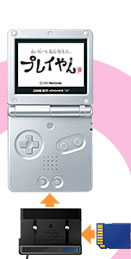
The PLAY-YAN was a portable audio and video player developed and released by Nintendo for the Gameboy Advance SP that was capable of playing .ASF format movies and .mp3 format audio from standard SD cards of up to 2 GB in size [1] [2]. The adaptor was also compatible with the Gameboy Micro and the Nintendo DS [1]. The device was similar in concept to AM3's Smart Media Player in that it could play media files off of a media card, except for the fact that the PLAY-YAN used SD cards, could be used to play audio files in addition to videos and that the PLAY-YAN allows users to add their own files and play them. The PLAY-YAN retailed in Japan at a price of 5, 000 yen.

Image From: Link
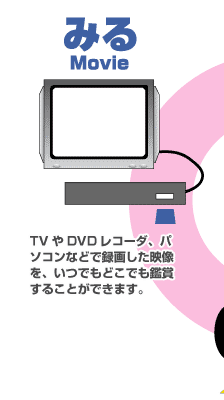
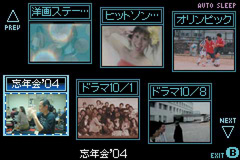
The PLAY-YAN could play .asf files recorded from TVS, PCs, and DVD recorders. The movie list is displayed with thumbnails to make it easier to find a particular video [1].


Image From: Link
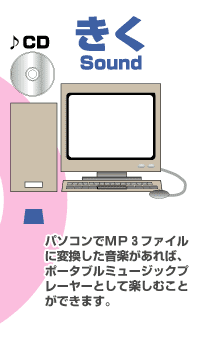
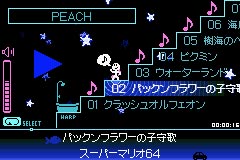
The .mp3 format audio files on the PLAY-YAN can be played with shuffle and song repeat. The file browser supports ID3 tags, as well as allows files to be nested within folders. You can also adjust the surround effect level and set the bass effect [1]. Pressing the 'A' button while listening to music can activate a secret minigame. More details can be found here.

The official Nintendo page for the PLAY-YAN also has a 'garage' section which offers 12 downloadable minigames, as well as a 13th hidden game at the bottom of the page which can be found here. As of September 11 2005, the PLAY-YAN was discontinued in favour of the PLAY-YAN micro.

Image From: Link

Alongside the release of the Gameboy Micro in Japan, an updated version of the device known as the PLAY-YAN micro was released also for 5,000 yen. The PLAY-YAN micro, in addition to the .asf playback of the original now also supports .mp4 formatted videos as well as had improved audio quality through the inbuilt headphone jack. The PLAY-YAN micro removed support for the minigames. The PLAY-YAN micro was only available through Nintendo of Japan's online store, and could come with a computer program on a CD called 'MediaStage Ver. 4.4 for Nintendo', which allowed users to manage video and music files on a computer. This program would cost an additional 1,000 yen [3].

The sick-figure that appears in the music menu on the Japanese version of the hardware is also a character from the Japanese exclusive GBA game Rhythm Tengoku as well as the arcade game Night Walk ans was later used as a visualisation on the 3DS for its sound feature [3].

Give Some Support By Subscribing on YouTube

ads

My Thoughts of FUNA's Anime Adaptations

The Evolution of Funa’s Isekai: A Retrospective on Three Anime Adaptations The Isekai genre is a staple of modern anime, but few authors hav...